Affected FORSIS Product Series
All FORSIS Industrial Panel PCs from the EXPERT, PROFI, MOBILE, and MASTER series.
Background Information

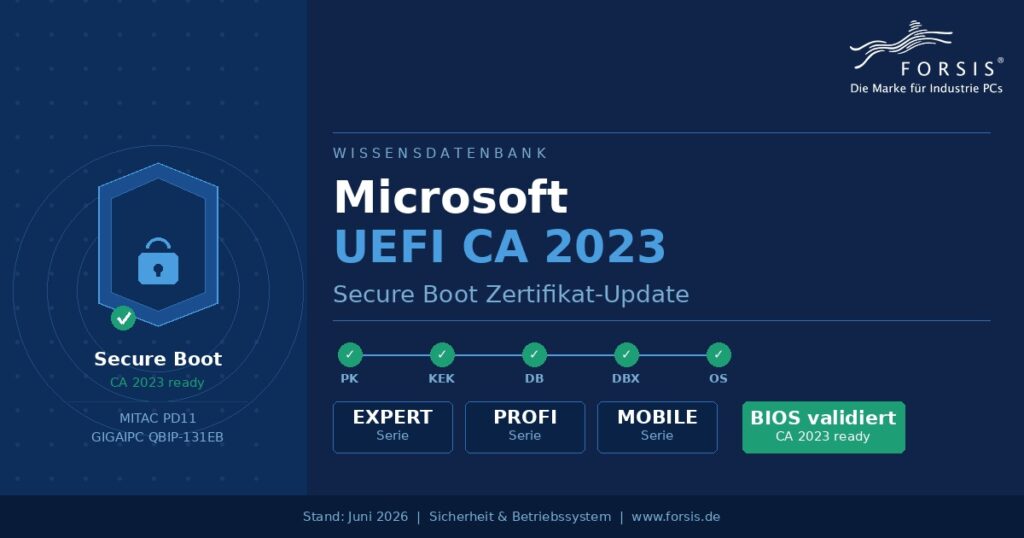
In June 2026, Microsoft began replacing the original Secure Boot certificates from 2011. The old certificates are expiring or will expire soon. For you, this means that FORSIS Industrial PCs that are not updated to the new 2023 certificates will no longer receive security-relevant updates for the boot process from that point onwards.
Depending on the age and BIOS status of the industrial PC in use, an action may be required. We would like to support you with this.
Technical Terms on UEFI CA 2023
Below is a brief overview of the various technical terms to facilitate a better understanding.
| Technical Term | A brief explanation |
|---|---|
| Secure Boot | Security feature in UEFI BIOS. Ensures that only trusted, digitally signed software is loaded during startup. Prevents bootkits and rootkits |
| UEFI | Unified Extensible Firmware Interface – modern successor to the classic BIOS. Firmware interface between hardware and operating system. |
| UEFI CA 2023 | The new Microsoft certificate (Certificate Authority 2023) that will be used to sign all Windows boot components from 2026 onwards |
| Platform Key (PK) | The system’s master key, embedded in the motherboard firmware by the manufacturer, e.g., MITAC, IGAIPC, etc., for our FORSIS devices. This can only be changed via a BIOS update. |
| Key Exchange Key (KEK) | Authorizes changes to the signature databases DB and DBX. Must contain the new ‘Microsoft Corporation KEK 2K CA 2023’ |
| Signature Database (DB) | Database of allowed signatures. Must contain ‘Windows UEFI CA 2023’ for the Boot Manager to be trusted. |
| forbidden sig. DB (DBX) | Revocation list: Compromised or withdrawn boot signatures are entered here. Continuously updated by Microsoft. |
| chain of trust | Hierarchical chain of trust: PK → KEK → DB/DBX → Bootloader → Operating System. Each level verifies the next. |
The Chain of Trust
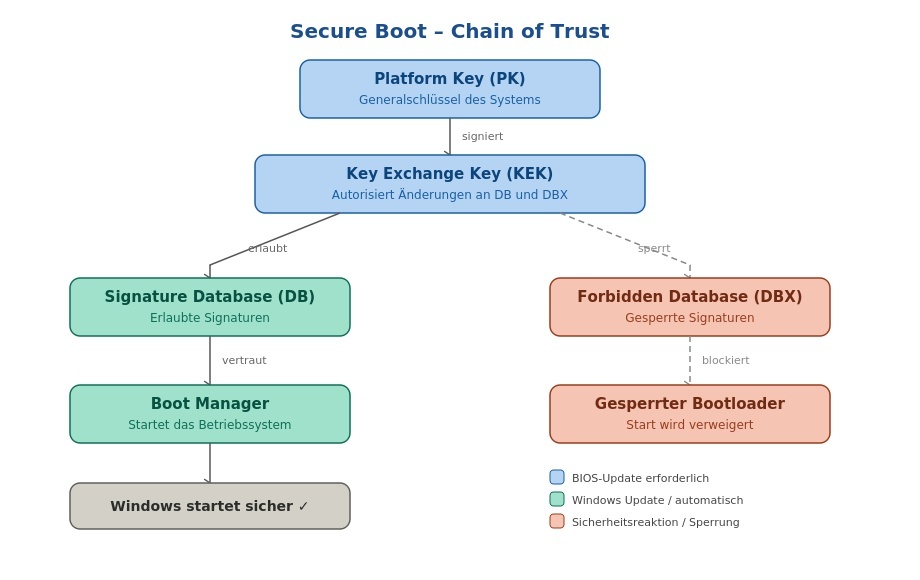
Secure Boot operates with a hierarchical trust structure.
Each level must be current for the update to take full effect.
As a system integrator, we generally receive the PK and KEK keys from the motherboard providers. This does not necessarily apply to all boards previously used. However, we are happy to provide you with information on this.
Only a BIOS update from the manufacturer can correctly integrate the new Microsoft KEK 2K CA 2023 key into the firmware.
What happens if you do not perform an update
Devices without updated certificates will continue to boot normally and receive regular Windows updates.
However, these devices
- can no longer receive security-relevant updates for the boot process
- cannot install updated Windows Boot Manager versions
- cannot adopt new entries in the revocation list (DBX)
- can no longer account for known boot vulnerabilities (e.g., BlackLotus / CVE-2023-24932)
In the long term, this means that the FORSIS Industrial PC will remain at the security standard of October 2026 and will become increasingly vulnerable to attacks.
FORSIS New Device Deliveries
No action is required here. FORSIS delivers all current devices with the already validated BIOS standard. Windows update handles the further steps.
FORSIS Existing Devices
Below you will find a table with board type and INTEL CPU generation. All devices before the eighth generation cannot be considered, as the TPM chip is missing here. For the following devices, an individual check is usually required. You must check the status, and you will find instructions on how to do this after the table.
| Mainboard | Generation | CA2023 Secure boot update incl. Intel ME available | Status |
| Wafer ULT 5 | 8G | YES | |
| Wafer TGL R10/R11/R12 | 11G | YES | |
| MITAC PD10EHI | 10G | YES | |
| MITAC PD11TGS | 11G | YES | |
| MIO-5373 | 8G | YES | |
| MIO-5375 | 11G | YES | |
| QBIP-13 | 13G | YES | available |
| QBIP CORE ULTRA II | Core Ultra 225 /235U | implemented |
Step 1: Quick Check via Windows Security
Windows Settings → Privacy & Security → Windows Security → Device Security → Secure Boot
- Green symbol: All certificates are up to date. No further action required.
- Yellow warning symbol: The device has not yet received the update. Proceed to Step 2.
Step 2: Detailed Check Command (PowerShell as Administrator)
[System.Text.Encoding]::ASCII.GetString((Get-SecureBootUEFI kek).bytes) -match ‘Microsoft Corporation KEK 2K CA 2023’
[System.Text.Encoding]::ASCII.GetString((Get-SecureBootUEFI db).bytes) -match ‘Windows UEFI CA 2023’
Check KEK – must return True
Check DB – must return True
Tip: The complete FORSIS check script (FORSIS-SecureBoot-Check.ps1) is available in the download area on www.forsis.de and provides a clear status report for all relevant certificates.
Step 3: Existing Device – BIOS Update Required
If one of the check commands returns ‘False’, a BIOS update must be installed.
Important note before the update: If BitLocker is active on the device, have the recovery key ready or temporarily deactivate BitLocker. A BIOS update can trigger BitLocker protection.
Contact our support
We would be happy to advise you personally on this topic. Very often in the past, we have made customer-specific adjustments to the BIOS. We must now take this into account.